A configuration bundle packages selected Wave resources so they can be imported into another Wave account.
Use a bundle when several people need the same starting configuration, such as a campaign, collection, message template, or reusable asset. A bundle is a setup transfer, not a live synchronization between accounts.
Plan the Bundle
List the resources that the receiving account needs before opening the builder.
| Resource | Include it when |
|---|---|
| Campaigns | The receiving account needs the campaign structure and messages. |
| Collections | A campaign depends on a saved audience rule or collection relationship. |
| Message Templates | The campaign or team will reuse saved message content. |
| Assets | The setup depends on an approved reusable file or voice asset. |
| Blasts | A reusable one-time Blast setup is intentionally part of the transfer. |
| Contacts | Customer data must be transferred and the transfer is specifically authorized. |
For most starter templates, leave Contacts unselected.
Create a Bundle
- Open Settings.
- Select Configuration bundles.
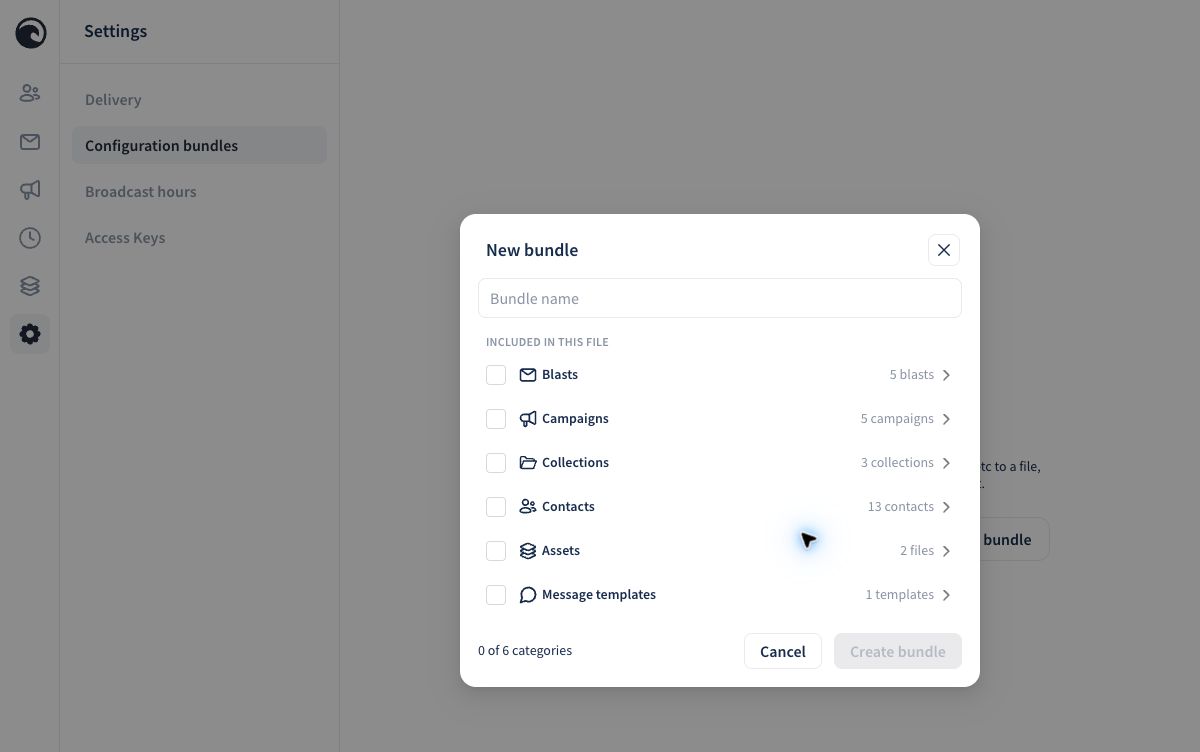
- Select Create bundle.
- Enter a descriptive bundle name.
- Select the categories to include.
- Review the selected item counts.
- Select Create bundle.
- Copy the generated bundle key and store it with the setup instructions.
The current builder can include:
- Blasts
- Campaigns
- Collections
- Contacts
- Assets
- Message Templates
Wave generates the bundle key automatically. The bundle name can be descriptive, but the generated key cannot be customized from the current screen.
Protect Contact Data
For a reusable template, leave Contacts unselected unless transferring that customer data is intentional and authorized. A campaign starter normally needs its Campaign, related Collection, and any required template or asset, but not the customer's contact list.
Before creating the bundle, review the selected counts. A nonzero Contacts count means contact records are part of the selected bundle scope.
Include Related Items
A campaign and collection are separate resources. When a campaign relies on a collection, include both categories and confirm that the source campaign shows the collection under Contacts before creating the bundle.
The same principle applies to saved templates and assets. Include the supporting resource when the receiving account needs it to reproduce the intended setup.
Store and Share the Key
Wave creates the key automatically. Copy the entire value without spaces or omitted characters. Share it only with the people who should be able to import the bundle.
Keep these details with the key:
- bundle name
- purpose
- source persona
- included categories
- expected item counts
- date tested
- any required setup after import
Do not place a bundle key in a public screenshot or public knowledge-base example.
Test in Another Persona
Before sharing the key:
- Confirm that the source Campaign contains its intended messages.
- Confirm that its Collection is attached under Contacts when that relationship is required.
- Include both Campaigns and Collections in the bundle.
- Import the key into a separate test account.
- Confirm that the imported Campaign is disabled and that the Collection relationship is restored.
- Confirm that no sending number or customer data was carried into the test account.
Also open every imported message and check its content, timing, and personalization fields. Keep imported campaigns disabled until the receiving account selects its sender and completes a controlled test.
What Success Looks Like
- the import preview shows the expected categories and counts
- the receiving account gets the intended resources
- related Campaign and Collection objects remain connected
- no customer data or sender number is included unintentionally
- imported campaigns remain disabled until reviewed
- the receiving user can follow the setup instructions without access to the source account
Continue with Importing Configuration Bundles.